2026 · GWI
Crafting the MCP experience to grow the user base ~40% month on month
- Role
- UX on the API/MCP squad
- Project length
- 4 months
- What shipped
- 2 MCP apps, 3 tools
- Impact
- ~40% avg MoM user growth Nov–Jun
GWI holds one of the largest consumer datasets in the world. Using it has always meant learning the intricacies of the platform. GWI launched Agent Spark in 2025, which shifted the landscape and put more power in the hands of non-power users. In late 2025, the GWI MCP launched.
We found our users were already using AI as part of their workflow, but it was messy and inconsistent. They were exporting data into Claude and ChatGPT to make sense of it, and the MCP gave that workflow some structure.
I joined the API/MCP squad to shape how users interacted with the MCP. It was new and picking up speed, and my job was to grow it by solving real user problems and shaping the UX around them.
This was a new experience for me. The MCP was a surface with no UI to manipulate. The outcomes were non-deterministic, and it sat on a data model with hard rules. Most of the design work happened in the connective tissue between them: the orchestration of the MCP, GWI's architecture, the client, the tools, and the resources.
Moving at pace
The landscape moved weekly. Frontier models shifted, clients were building proprietary tools, and I had to move fast to keep up. There was no design system or best practice for AI-native surfaces, so I had to define what good looked like.
The Problem
We spoke to around 100 users to hear what was working, what wasn't, and how they were actually working. Two topics kept coming up:
- Users wanted to query using audiences they'd created in the platform.
- Users wanted access to custom study datasets in the MCP.
Both came down to the same thing. The MCP could query GWI data, but not the objects they've created on the platform.
The Challenge
GWI's data already had a structure, and that structure set the constraints for the experience.
Datasets
Each dataset is a survey that a set of respondents answered. Datasets are grouped under a top-level ecosystem, and an ecosystem can hold several studies beneath it. Custom studies are client-commissioned datasets that live under an ecosystem. Ecosystems aren't compatible with each other, since the respondents are different.
Audiences
A saved group of respondents, built by the user. Every audience is pinned to a single dataset or ecosystem.
A single organisation could have 100+ meticulously built audiences, and even more custom studies, on top of our global datasets and ecosystems. Respondents belong to one ecosystem, so audiences and studies from different ecosystems can't be combined. This rule is invisible to the user and easy for a model to trip over. Designing around it, without making the user learn it, was the real work.
Ideation
I started by mapping a hybrid user-flow and system diagram. It got us aligned on the happy path, but it also mapped out the error handling we'd need to navigate, and helped us think through which tools the flow required.
We mapped out the tools we'd need to solve the problems. There ended up being three:
List Datasets. Lists a user's available datasets and lets them switch them on and off.Audience List. Lists the audiences a user has saved to the platform.
List datasets
List Datasets surfaces the full dataset tree: ecosystems, the studies beneath them, and the custom studies that hang off each one. It lets the user switch any of them on or off, and returns that tree as a JSON response the model can walk, whether or not there's an app to draw it.
response.json
{
  "datasets": [
    {
      "code": "ds-core",
      "name": "GWI Core",
      "type": "dataset",
      "description": "Primary data set on digital consumer attitudes and behaviors",
      "children": [
        {
          "id": 446,
          "name": "GWI Syndicated",
          "type": "folder",
          "children": [
            {
              "code": "ds-gwi-alcohol",
              "name": "GWI Alcohol",
              "type": "dataset",
              "description": "Consumption and purchase behaviors of alcohol consumers"
            },
            {
              "id": 435,
              "name": "GWI Pulse",
              "type": "folder",
              "children": [
                {
                  "code": "ds-gwi-gwi-jos",
                  "name": "July 2026 Pulse Week 1 (USA)",
                  "type": "dataset",
                  "description": "FIFA World Cup 2026, AI Saturation, NBA Finals, AI"
                }
              ]
            }
          ]
        }
      ]
    }
  ]
}
With every available dataset in hand, the agent can show them to the user, read a short description of each one, and understand the folder structure they sit in.
Audience list
Audience List returns the audiences a user has saved to the platform, scoped to whatever dataset or ecosystem is currently active so nothing incompatible ever shows up.
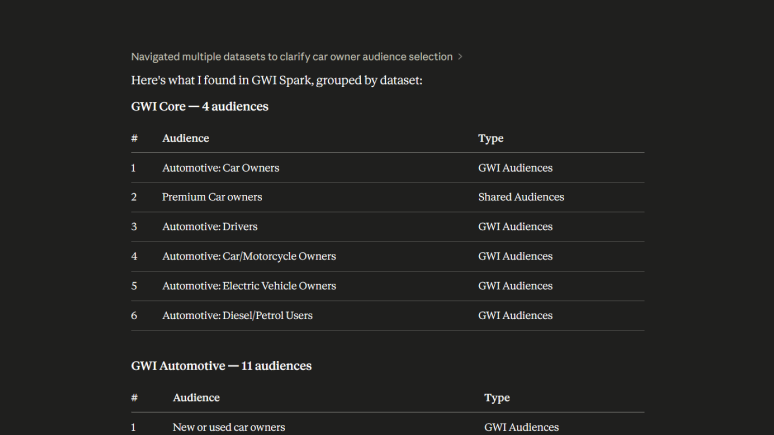
The tools were the easy part. The hard part was the state between them, and how a change in one rippled into the others. Three decisions did most of the work.
Selecting an audience with nothing active shouldn't dead-end. So it auto-activates the audience's parent dataset and tells the user it did. They name what they want, and the system works out where it lives.
Clearing a dataset shouldn't wipe your work. So clearing the filter keeps your selected audiences and just widens the view. Switching to an incompatible dataset is different, and that one warns you first, because it has to drop what no longer fits.
A cross-ecosystem pick shouldn't fail silently or throw an error. So it becomes a choice, with the cost spelled out: switch and lose the current selection, or stay. The one-ecosystem rule is the highest priority in the system, and nothing overrides it, but the user always sees the trade before it happens.
None of this shows up as UI. It's a set of rules the model follows so the valid path stays the easy one.
I wrote the flow as a skill: markdown-defined guidance that runs inside the MCP itself.
That gave the developers a working prototype of how a user should move through the tools. It closed the gap between "here is what I mean" and "here is the thing running" to almost nothing, and it turned out to be the most useful handover artefact of the whole project.
MCP Apps
In January, the MCP launched MCP apps. This opened up some interesting use cases and gave us a surface to solve more of our users' problems. It looked like a big opportunity at first, but after some discovery there were a few cons:
- Another surface to maintain.
- Doesn't work for all clients.
- UX and UI restrictions imposed by the frontier models.
We decided to treat MCP apps as a bonus for the clients that could ingest them. We still needed a text-relay fallback that would work with any agent, though.
Using Cursor, I built a prototype MCP app wired directly to Claude. That gave us something real to demonstrate to the business, and a foundation of ideas to build on.
Testing
Testing a non-deterministic surface is its own thing. The same prompt won't always produce the same tool call, so I stopped looking for one correct path and started checking something else: does the design make the valid path the easy one, and the invalid path hard to stumble into?
Putting the tools in front of users surfaced a few things to fix:
- The Audiences app showed too many attributes at once, so I cut it back.
- The MCP's response copy was too verbose, so I tightened it.
- Skills gave newer users a way in. Power users ignored them, which was the point.
What Shipped
Two MCP apps, three tools, and their instructions all shipped across four months. Users could now query GWI data using every object they'd built on the platform.
The Impact
From November to June, active MCP users grew about 40% month on month on average, from 29 to 317.
API requests and users
Monthly usage from August 2025 to June 2026. Lines are scaled independently.
- Users were able to query GWI data using objects they'd built on the platform.
- Active users grew ~40% month on month on average between November and June (29 → 317).
Reflection
The interesting part of this project was never the UI. It was designing a set of rules a probabilistic model would follow, on a surface I couldn't fully see, for data with constraints the user should never have to think about. The apps are the visible five percent. The other ninety-five is the tool design, the state model, and the flows that keep a valid answer the path of least resistance.